 App2gether Business
Your venue's events and customers, in one app.
App2gether Business is the app for venues to organize events and their relationship with their audience. Create an event in a few steps, share the link, send the invitation to your customer group and track who confirmed attendance.
- Events
- Customer group
- Invitations
- Confirmations
For iPhone. The app interface is in Brazilian Portuguese.
Everything to organize your event
From the first invitation to the list of who will show up.
Create events step by step
Pick the event type, the invitation template, one or more days and the time. Before publishing, a summary screen shows the name, the customer group, the date and the time so you can check them.
Customer group
Build the customer list of your venue. Each group has a link and a QR Code to share, and you can see who joined the list.
Invitation templates
Create the invitation once and use it in several events: name, description, rules and an image taken on the spot or picked from the photo library. Each company can have up to 10 templates.
Attendance confirmations
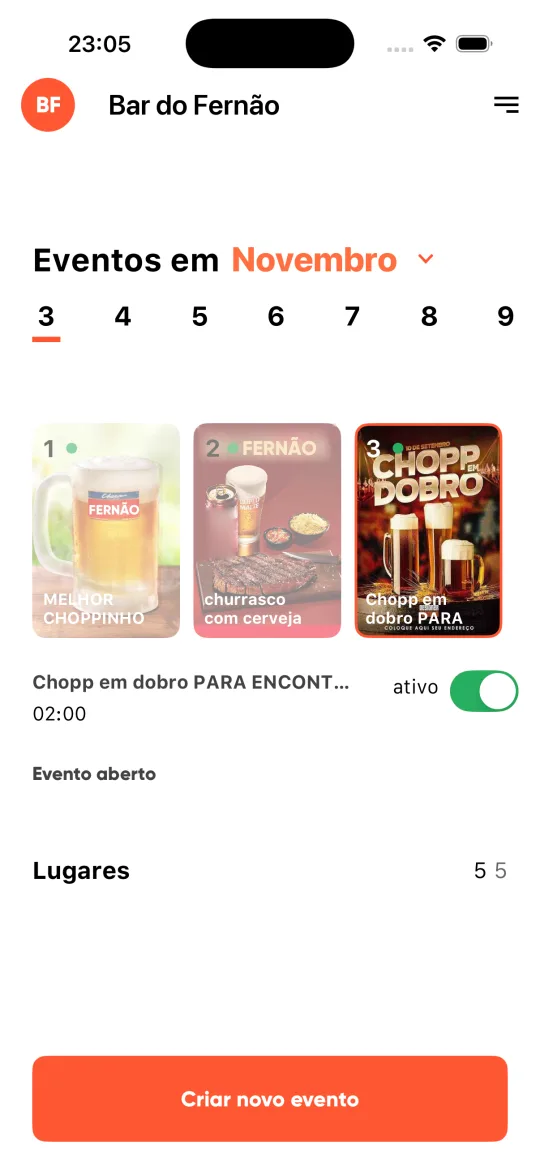
On the home screen, a calendar shows each day's events with the seats and the number of confirmed guests. Open an event to see the list of confirmed people.
Block when you need to
You can block a customer straight from the group list or from the confirmed list. Blocked customers are gathered on their own screen, where you can lift the block.
Company profile
Photo, phone, city, address and type of venue, plus website and Instagram. With your location, customers see where your venue is. This is also where you adjust the available seats.
Three ways to publish an event
Choose who can see it and confirm attendance.
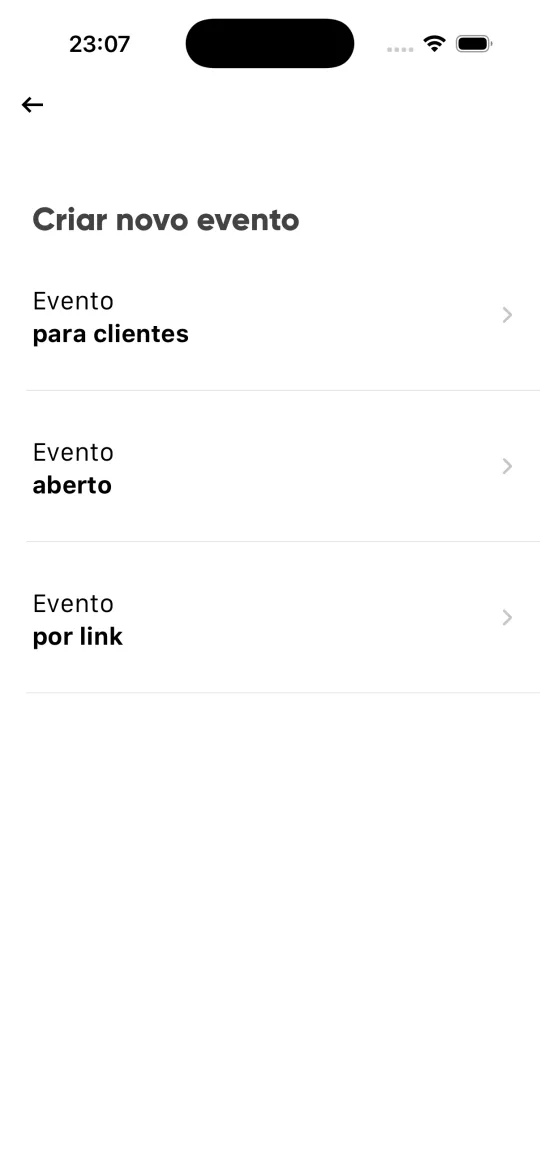
Create new event: three types
Customer event
You pick one or more customer groups and the event is published to them. It is the way to reach people who are already on your list.
Open event
A public event, built from one of your invitation templates. The app warns you if you already have an open event published on any of the chosen days.
Link event
A private event: only people with the link can confirm attendance. When you publish, the app offers a Share button so you can send the link right away.
From sign-up to your first event
The app guides you: the first step is to create your customer group and your invitations.
1. Create your account with your phone
Pick the country, enter your phone and confirm the code sent by SMS. Then enter the city, the company name and the venue address.
2. Build your customer group
Name the group and share the link or the QR Code. To create a group, the company profile needs an image.
3. Create an invitation template
Write the name, the description and the rules and choose the image. A template used in a published event cannot be edited or removed.
4. Publish the event
Choose the type, the invitation, the days and the time, check the summary and publish. Then follow the confirmations on the home screen.
Frequently asked questions
Who is App2gether Business for?
For businesses and venues that host events and want a direct relationship with their customers. The app lets you create events, build a customer group and track attendance confirmations.
How do I create my account?
With your phone number, confirmed by a code sent by SMS. Then you enter the city, the company name and the venue address. The account can be deleted from within the app, in the menu, also with an SMS confirmation.
What is the difference between the three event types?
A customer event is published to the customer groups you choose. An open event is public. A link event is private: only people who received the link can confirm attendance.
How do customers join my group?
Each customer group has its own link and QR Code, which you share from the app. In the group list you see who joined and can block a customer when needed.
Where do customers confirm attendance?
Customers use the App2gether customer app, which currently exists for Android. App2gether Business is the venue side: it creates the events and shows who confirmed.
Are there limits on seats or invitations?
Each company can have up to 10 invitation templates. The number of seats of the venue is limited by your plan and subject to daily review by the platform.
Which devices and languages?
iPhone, always in portrait orientation. The app interface is in Brazilian Portuguese only.
App2gether Business for iPhone
Coming soon to the App Store. Want to know when it is out? Get in touch.